Watch one fault travel through the whole system.
Every step on this page opens the live demo. Nothing to install, nobody to sign in as, no sales call behind a form. Someone spots a problem; seven steps later the trust has the evidence.
The demo runs a fictional four-school trust with realistic jobs, inspections and compliance data. Click around, break nothing, take your time.
Pick your starting point
Three product lines, three demos. Silver is FMProof. Gold adds InspectProof. Platinum adds GovernanceProof.
FMProof Run the estate
Faults, work orders, site teams and contractors. Follow one job end to end in steps 1 to 4 below.
Try FMProofInspectProof Inspect and assure
Digital inspections that raise their own jobs, plus the AI photo and email triage. Step 5, and the AI moments in steps 1 and 2.
Try InspectProofGovernanceProof Board-level
Board packs, e-signed approvals, policies and registers in a fictional trust's boardroom, with the live estate dashboard included.
Try GovernanceProofThe full three-minute walkthrough
One fault, all six roles, from report to trust-level evidence, narrated. Real screens, real clicks; turn your sound on. Then follow the steps below and try it yourself.
Seven steps, one job
Each step opens the app that role would use, in a new tab. Start anywhere.
A fault gets reported in under a minute
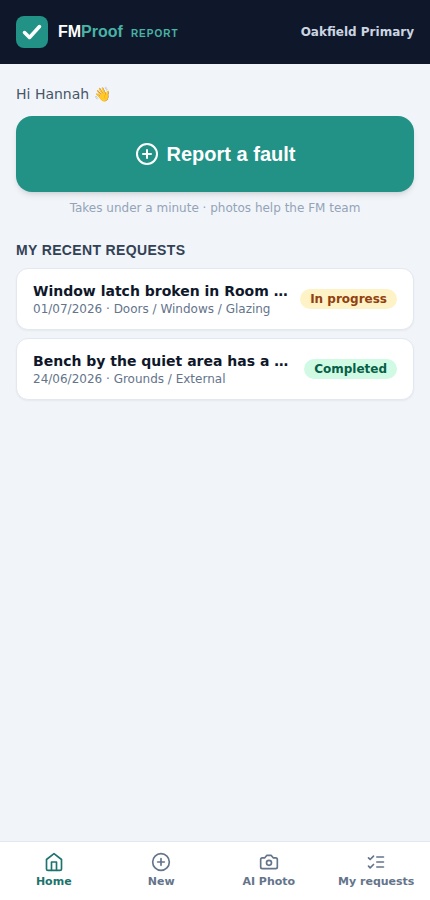
FMProof Requester, for school staff
A teacher spots a broken window latch, picks the room from a list of the school's own rooms, snaps a photo and taps send. On Gold and Platinum the AI reads the photo and drafts the job itself: category, priority, description. The report is useful before a human has touched it. The room list is read from your own site records rather than made up, so a fault arrives pinned to somewhere that actually exists. The member of staff can watch progress instead of chasing the office.
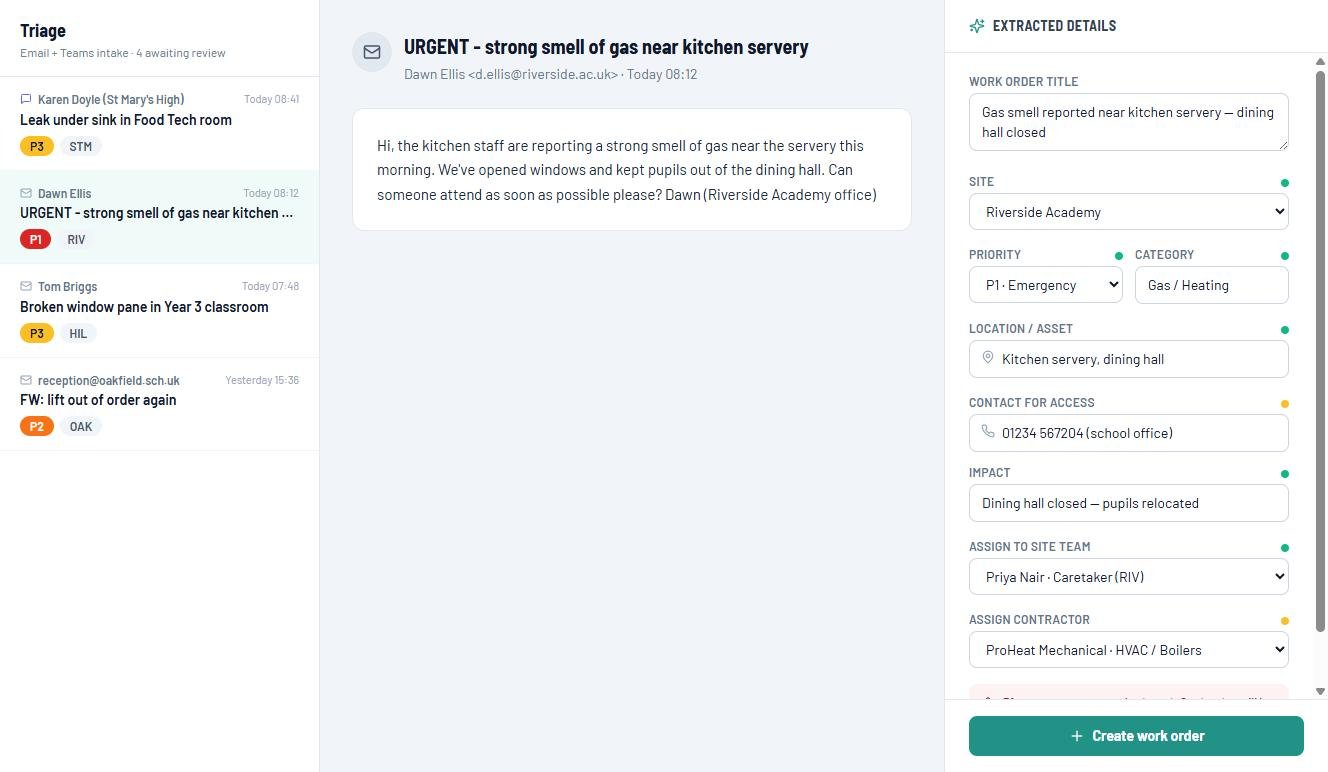
Emails and reports become work orders, not a to-do pile
FMProof FM Hub, with InspectProof AI triage (Gold and above)
Every report, whether it came by app, email or Teams, lands in one triage inbox. The AI has already extracted the site, location, priority and access contact from the message, so assigning it is two clicks. Around it sits the whole estate: open jobs, emergencies, the PPM schedule, assets and contractors, live on one screen.
The site team works it from a phone in a corridor
FMProof Site Team, with the InspectProof safety layer (Gold and above)
Caretakers see their own jobs and nothing else. Start with a tap, attach before-and-after photos, add a note, complete and sign off, or bounce it back marked "contractor required". The Safety area holds the serious material: the asbestos register, risk assessments, the fabric-disturbance record. Where a site has none of that held against it, starting a job puts up a warning that cannot be missed and writes down who confirmed they had checked, by name and time, as its own line in the job history. It does not stop the work. A leaking radiator at four on a Friday still gets fixed, but the decision is on the record.
Contractors update jobs without a login
FMProof Contractor portal
When outside help is needed, the contractor gets a magic link: the job, the access details, somewhere to attach their paperwork. They move it through the same six states the office is looking at (booked in, on site, in progress, waiting on parts, on hold, complete) so nobody has to ring to ask where it has got to. No account, no password reset, no reason for them not to use it, and every visit is on the record.
Inspections that raise their own jobs
InspectProof Inspections
Fire walks, water checks, emergency lighting, PAT, playground equipment: done on a phone, answer by answer. Anything marked as failed becomes a work order automatically, with the photo and priority attached. Findings never sit in a paper file waiting to be typed up.

The trust sees compliance it can evidence
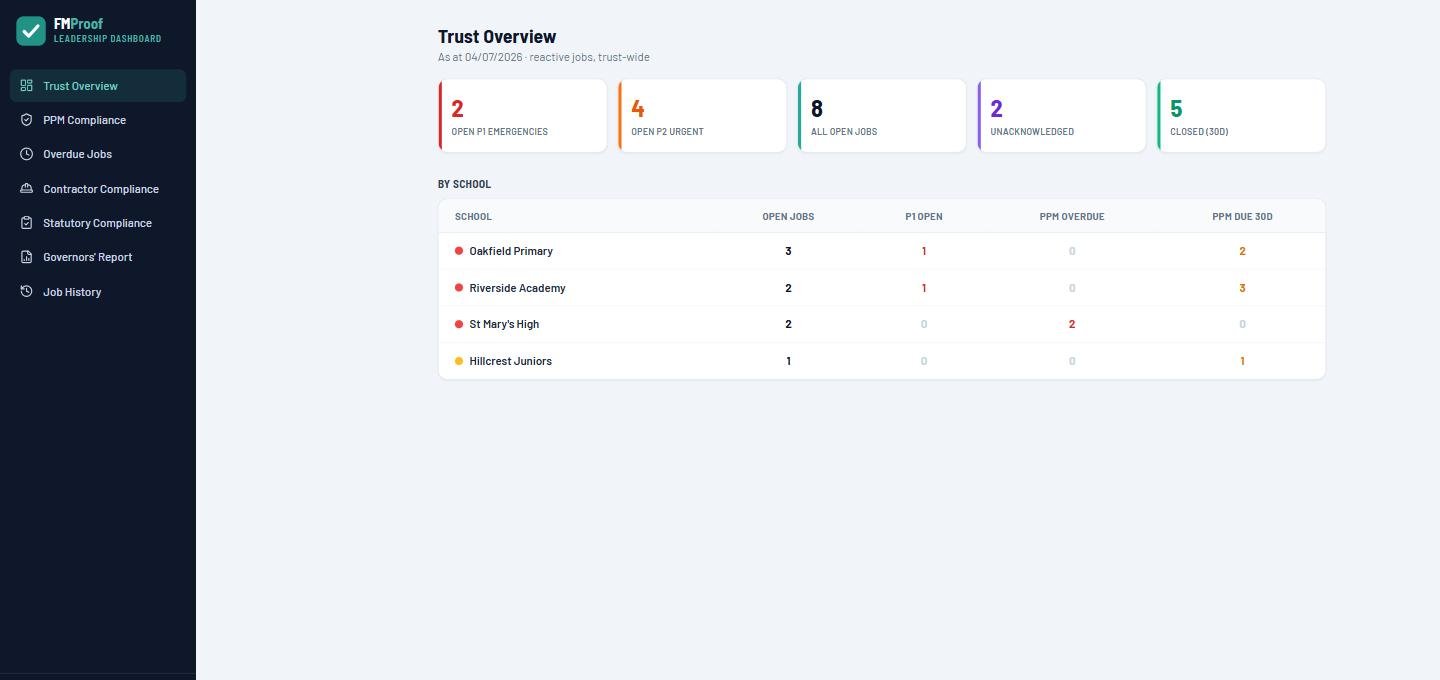
FMProof Leadership Dashboard, trust view
A live rollup across every school: PPM compliance, overdue jobs, contractor performance, full job history. Governance view is read-only, built for trustees rather than the boiler room, and the governors' report is one click to PDF. When the auditor asks, the answer takes minutes, not a weekend.
The month's numbers come out of the same jobs
FMProof Reports, inside the FM Hub
Four questions, answered off the live list instead of a spreadsheet somebody keeps by hand: how many jobs were raised, what is still open and how old it is, who it is sitting with, and what got finished and how long it took. Choose this month, last month, this term or the academic year, choose one school or all of them, and send exactly what is on the screen to Excel. Jobs sitting with nobody get counted as their own answer rather than folded in with the rest, and anything the system cannot measure fairly, like a job with no completion date, is named beside the figure instead of averaged in.
It sits inside the Microsoft 365 you already pay for
EstateProof is not another website with another password. It installs into your own tenant, so the apps pin into Teams alongside everything else your staff open each morning: on the desktop, in the browser and on the Teams app on a phone. A caretaker taps Site Team in Teams and they are in, because they signed in to Microsoft an hour ago. That one detail is the difference between a system people use and a system people mean to use.
It is not a skin over somebody else's cloud either. The jobs, the photos, the certificates and the audit trail are rows in SharePoint Lists on a site in your tenant, under your retention policy and your backup. Most estates systems ask you to leave Microsoft to reach your own records. This one never does.
- Pinned in Teams: desktop, browser and phone
- One sign-in: the Microsoft account they already use every day
- No new Microsoft licences to buy, nothing to install on a device
- Someone leaves, IT disables the account, and their access goes with it
- Everything stays in your own SharePoint: your governance, your audit trail, your tenant
- Unlimited users on every plan, no per-user fees
Under the bonnet: where your data actually lives
For your IT team. No black box. Every job, inspection and compliance record sits in Lists on a SharePoint site in your own Microsoft 365 tenant: your governance, your audit trail, your backup. Sixty seconds of the engine room.
Recorded from a real SharePoint site. The data shown is a fictional four-school trust. Cancel any time. Every row stays in your tenant.
Seen enough to want a price?
Put your site count into the calculator for a written price on the published rates, or book thirty minutes with the founder in a Microsoft 365 like yours. If you are weighing us against an incumbent, the comparison page has the figures side by side.