School compliance and estates management software for multi-academy trusts
EstateProof keeps your statutory checks, planned maintenance, reactive jobs and estate records in one place, and it runs inside your trust’s own Microsoft 365. Your data stays with the trust, not with us.
Built by someone who has done the job
I spent seven years as Director of Estates and Facilities at a multi-academy trust. The hardest part of the job was not fixing buildings. It was knowing, at any moment, whether every school was up to date on its checks, and being able to prove it to the board, the auditors or the DfE.
EstateProof is the system I wanted then. It is built around how trust estates teams actually work, rather than adapted from software made for office blocks or hospitals.
What it covers
Three product lines, one set of records. Silver is FMProof. Gold adds InspectProof. Platinum adds GovernanceProof.
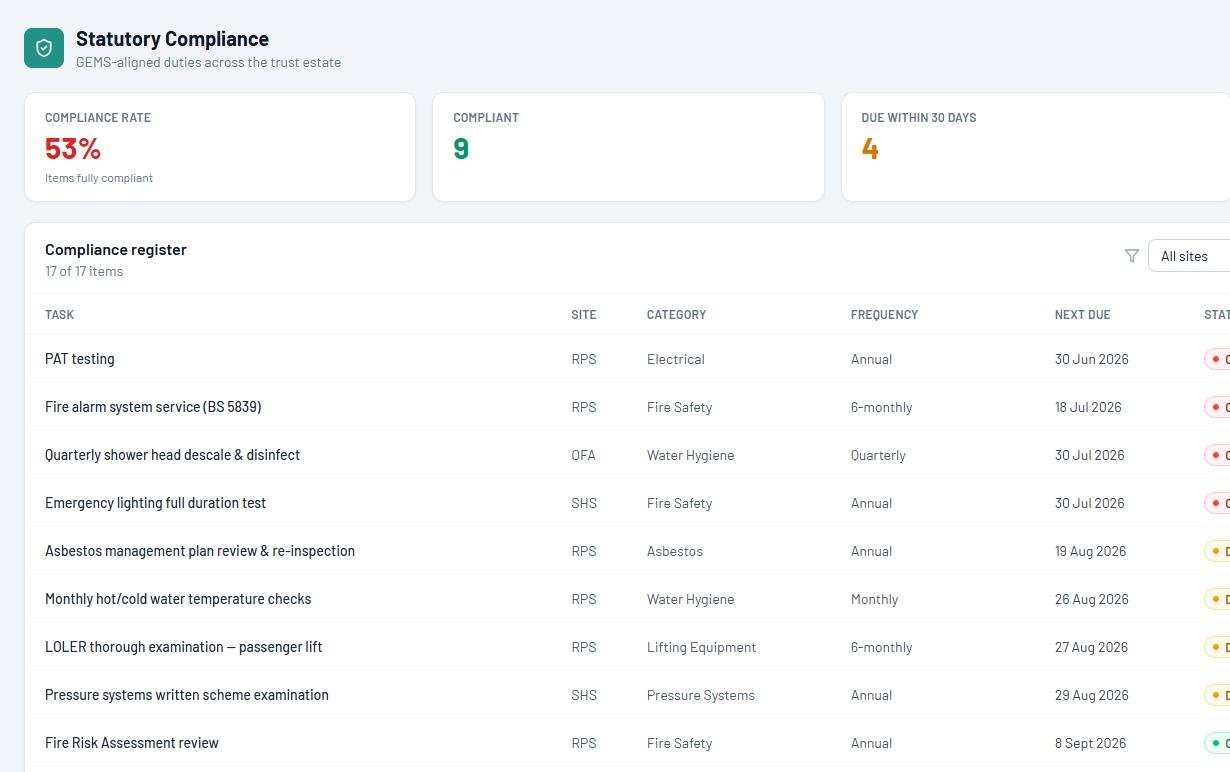
Statutory compliance Every package
Every check across every school, with due dates, certificates and who is responsible, so nothing lapses without someone knowing. Still weighing up options? Start with our guide to what school compliance software must cover.
Planned maintenance Run the estate
Servicing schedules for plant and equipment, raising their own jobs as they fall due, with contractors’ visits and reports kept against each asset. New to the category? Start with our guide to estates management software for schools.
Reactive jobs Run the estate
Staff report faults from a phone or a laptop in under a minute. The estates team triages them, assigns them and closes them off, and the person who reported it can see where it got to.
Asbestos, floor plans and risk assessments In front of the work
Registers and plans held against each site, with risk assessments linked to the work they cover, so a job cannot be started against a building whose hazard data nobody has looked at.
The Leadership Dashboard Prove it
A clear view of compliance across the whole estate for the COO, the CFO and the board, built from the same records the site team fills in day to day.
An app for everyone who touches the estate
- FM Hub, for the estates team: jobs, maintenance schedules and compliance in one place.
- Site Team, for caretakers and site staff: today’s tasks, on a phone.
- Requester, for school staff: report a fault in under a minute and see when it is done.
- Leadership Dashboard, for leaders and the board.
- GovernanceProof, the Platinum tier: the board’s own workspace for packs, approvals, attendance and declarations.
Priced per school per year, ex VAT, with unlimited users. No charge per login, and no extra cost for adding site staff or contractors. Published in full: Silver from £650, Gold from £1,150, Platinum from £1,650. See the pricing page.
Your governors see the estate, live
Statutory compliance, planned maintenance and health and safety figures sit on the board dashboard, so the estates report for each Trust Board or LGB meeting is generated from live data, not last term’s spreadsheet.
Your position against the DfE’s Estate Management Standards, without the questionnaire. It is calculated from the same records your site team fills in day to day: six pillars, school by school, updated overnight. Come the annual return, it starts from evidence you already hold rather than a blank form.
Governors here. Trustees there. Your words, everywhere.
A school sees Governors. Your Trust Board, your LGBs and your committee structure are all configured to match your scheme of delegation, not the other way round.
- Meeting packs for the Trust Board and local governing bodies, compiled to a single paginated PDF in minutes.
- E-signed approvals, with every decision timestamped and written to your register automatically.
- External governors and trustees join as secure Microsoft guests. No licence, no per-user fees.
Configured to your scheme of delegation
- Trust Board
- Local governing bodies
- Finance and Resources
- Estates and Audit
- Pay
What each body gets
- Its meeting pack as one paginated PDF
- Approvals e-signed and timestamped
- An estates report built from live data
- Guest sign-in for external members
Committee names are yours to set. These are the ones a walkthrough is configured with.
Your data stays in your trust
Most compliance systems keep your records on the supplier’s servers. If you leave, you have to ask for your data back, and it rarely comes back in a form you can use.
EstateProof works differently. It runs on SharePoint in your trust’s own Microsoft 365, so your estates records sit alongside the rest of the trust’s data, under your own security, retention and backup. Staff sign in with the Microsoft accounts they already have. If you ever stop using EstateProof, the data is still there. Security, data and AI, in full.
Frequently asked questions
What is school compliance software?
It is a system for keeping track of the checks, inspections and servicing a school or trust is legally required to carry out, such as fire safety, water hygiene, gas and electrical testing, and asbestos management. Good compliance software shows what is due, what is overdue and where the certificates are, across every site.
Is EstateProof a CAFM system?
It does the job of one. CAFM, computer-aided facilities management, usually means maintenance, jobs and assets. EstateProof covers all of that, but it is built around compliance first, because that is where trusts carry the most risk. There is more in our guide to CAFM for academy trusts.
Do we need to buy anything else?
You will need Microsoft 365 with SharePoint, which almost every trust already has. There is no charge per user, so every member of staff can report a fault without a licence.
Is EstateProof only for schools?
No. It started with schools and multi-academy trusts, but it works for any organisation managing more than one site, including care home groups, housing associations and charities.
Buying rather than browsing? Our longer guide covers cost, what auditors accept, and what happens to your records if you leave: what school compliance software must cover.
See it for yourself
The quickest way to see whether EstateProof fits your trust is a short walkthrough using your own estate as the example.