What leaves your tenant, and what never does.
EstateProof runs inside your own Microsoft 365. Two features in the live product, and one step at onboarding, send data to an external AI model so it can draft a job for one of your people to confirm.
This page sets out which ones, exactly what is sent, and what happens to it afterwards. If you are an IT lead or a data protection officer, it should answer your questions without a call. If it doesn't, ask us and we'll add the answer here.
Last reviewed 16 August 2026. EstateProof is a trading name of Brown Consult Ltd, registered in England and Wales, company no. 14117138.
Your records are in your Microsoft 365, not ours.
Every work order, photo, inspection record, certificate and audit trail is written into SharePoint inside your own tenant. We do not run a database with your estate in it. There is no EstateProof cloud holding a copy, because there is nothing for it to hold.
That means your records sit under your governance from the first day: your retention policy, your multi-factor authentication, your conditional access, your backup, your eDiscovery. Not ours, and not a supplier's interpretation of ours.
- Your IT grants consent once, through Microsoft Entra ID, and can revoke it at any time.
- Records are held under your own retention rules and are covered by your existing backup and eDiscovery.
- Cancel and you keep everything, in place, in standard formats. There is no export to request and no data to get back.
In your SharePoint
- Work orders, every job with its full timeline
- Compliance certificates, filed by duty and superseded on renewal
- Inspections, photos and sign-offs
- Photos, filed against the record
- The full audit trail
Held by us
- The app code
- Your licence and which apps are switched on
- No copy of your records
Sent to an AI model only when AI drafting is used: the text of a request, or a photo of a fault. Exactly what is sent, below.
Three things send data outside your tenant. Here is exactly what.
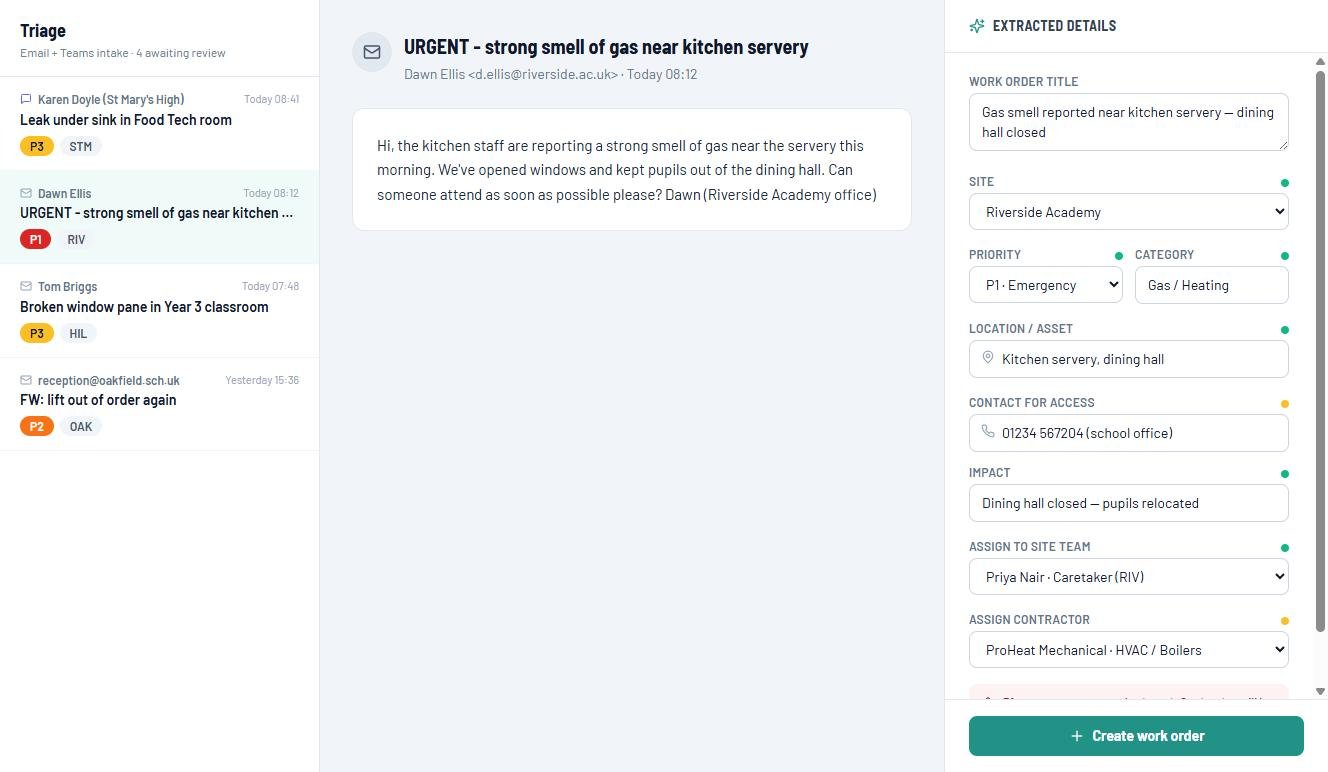
EstateProof's AI drafts work orders. To do that, the words of a request or the photograph of a fault are sent to a third-party model, which sends back a suggested title, category, priority and description. Nothing else in the platform works this way. If a feature is not in this table, it reads and writes only inside your tenant.
| Feature | Package | What is sent out | What is never sent |
|---|---|---|---|
| Email and Teams triageFM Hub | Gold and above | The subject line and body text of the request, up to the first 6,000 characters. With it goes a list of your site names, your site team's names and roles, and your contractors' names and trades, so the draft can suggest who should take the job. | Attachments. Your SharePoint records, work order history, inspection records, certificates, documents or board papers. |
| Photo to jobRequester, "AI Photo" | Gold and above | The photograph itself, and a fixed instruction telling the model to describe the fault it can see. | Location data, the reporter's identity, your site list, your staff list, or anything else. The image goes on its own. |
| Floor plan importOnboarding, run by us | Once, at setup | Pages of the floor plan drawings you give us, so that room names and numbers can be read off them into your location list. | Anything else. Nothing is imported until a person has reviewed the result and you have approved it. |
The record lands in your tenant
What comes back is a draft on a screen. When your site manager confirms it, the work order is written into your own SharePoint and it belongs to you like every other record. The AI does not hold the job; you do.
Our service stores none of it
The extraction service takes the request, calls the model, returns the draft and keeps no copy. It is a stateless function running on Microsoft Azure in the UK South region, not a database. There is no queue of your emails sitting on our side.
Your content does not train models
Anthropic does not use commercial API content to train its models, and does not retain prompts or responses in the ordinary course of API use. Content flagged by their automated safety systems can be held for up to two years. That limit is common to every major model provider, and one we would rather state than let you discover.
On Silver, nothing leaves at all
The AI features are part of InspectProof, which starts at Gold. A Silver customer's requests never reach an external model, because the feature is not switched on for them.
The AI drafts. People decide.
Category, priority, risk rating and description produced by the AI are drafting aids. They arrive as suggestions on a screen that a person confirms, edits or throws away. They are not statutory compliance determinations, they are not professional advice, and nothing in EstateProof acts on them by itself.
That distinction matters more here than in most software, because what EstateProof holds is evidence of statutory compliance. A priority the model reads wrong is a priority your site manager corrects at triage, before the job exists. The judgement stays with the person who is accountable for it.
- No work order is created from an AI draft until a person confirms it.
- If the AI service is unreachable, triage falls back to keyword rules and carries on. It is a convenience, not a dependency.
- Where one email describes several faults, each is drafted separately, and each must be either raised or explicitly discarded with a recorded reason. Nothing can be dropped without a trace.
Who else touches your data
One organisation, for one purpose.
| Sub-processor | What it is used for | Where it processes |
|---|---|---|
| AnthropicClaude API | Drafting a work order from the text of a request, from a photograph of a fault, or from a floor plan page at onboarding. | On Anthropic's own infrastructure, outside the UK and principally in the United States, under Standard Contractual Clauses. |
Microsoft is not on that list, because Microsoft is you
EstateProof runs on your own Microsoft 365 tenant, under your own agreement with Microsoft. We add no hosting layer of our own and hold no copy of your records.
The one piece of ours
The service that makes the AI call runs on Microsoft Azure in the UK South region under Brown Consult Ltd's subscription. It handles each request in memory and stores none of them. The API credential is held in that service's settings and never reaches a browser.
Data protection terms
Our processing agreement with Anthropic, including Standard Contractual Clauses, is in place through their commercial terms. Anthropic is named as a sub-processor in your contract with us, and we will tell existing customers before we add or change one.
You can switch the AI off and keep everything else.
Some organisations will not want an external model in the loop whatever the safeguards, and that is a reasonable position rather than an awkward one. Tell us at onboarding and we will disable AI drafting for your tenant.
Triage falls back to keyword rules and carries on. Photo reporting still works; it just stops drafting. Every other part of the platform is unchanged, and the price is the same.
- Switched off per tenant, not per user, so there is nothing for your staff to remember.
- Reversible. If you want to turn it on a year later, you can.
- No feature is withheld and no discount is withdrawn for saying no.
How we connect, and what we can reach
The short version: we hold no credentials of yours, and the application can only reach the specific SharePoint sites your IT hands it.
No EstateProof password Identity
Sign-in is Microsoft Entra ID. There is no separate user directory, no password for your staff to manage and none for us to lose. Your conditional access and MFA rules apply exactly as they do to everything else.
Sites.Selected, not the tenant Scope
Access to SharePoint uses Microsoft's Sites.Selected permission model. The application can reach only the sites your IT explicitly grants it: not your tenant at large, not your staff's mailboxes, not your drives.
Single-use links, no accounts Staff without accounts
Staff without a Microsoft account report faults through a single-use, rate-limited link. No account is created and no directory is built on our side.
Each role sees its own app Separation
Someone reporting a leak never sees contractor detail, cost or other staff records. Five role-based apps sit over one set of records, which is a simpler answer for your DPO than a permissions matrix.
One consent, revocable Revocation
Consent is granted once by an administrator and can be withdrawn from the Microsoft admin centre at any time, without contacting us. When it is withdrawn, the application stops. Your records stay exactly where they are.
We don't claim badges we don't hold On certifications
EstateProof does not currently hold a security certification. When it does, it will appear here with its date and its scope, rather than as a logo in a footer. In the meantime the architecture above is the argument, and we are happy to be tested on it.
Writing a DPIA? Take this page as your source.
Everything here is written to be quoted directly into a data protection impact assessment or a supplier security questionnaire. If you need it as a one-page attachment, or you have a question this page doesn't answer, email us and we will turn it round inside a working day, and add the answer here for the next person.