Run your whole estate, not just inspect it.
Fault reporting, work orders, statutory inspections and compliance evidence, running inside your own Microsoft 365. Your records stay in your tenant.
It runs in your Microsoft 365. We never hold your data.
Every work order, photo, inspection record and audit trail is written into your own SharePoint, on your tenant. Your team signs in with the Microsoft account they already have. No separate platform, no new password, no third-party cloud.
- Your IT grants consent once and can revoke it at any time.
- Nothing new for IT to vet. It uses your existing sign-in and permissions.
- Leave whenever you like and keep everything. It was always yours.
- One exception, said plainly: AI drafting sends the words of a request, or a photo of a fault, to an external model. Here is exactly what it sees.
In your tenant
- Work orders and job history
- Photos, before and after
- Inspection records and failed checks
- Certificates and statutory evidence
- Contractor details and insurance dates
- The full audit trail
In ours
- The app code
- Your licence and which apps are switched on
- Nothing about your buildings
Sent to an AI model only when you use AI drafting: the text of a request, or a photo of a fault. Security, data and AI, in full.
Five apps, one set of records
Each person sees only the app for their job. Someone reporting a leak never sees contractor rates, cost codes or other staff detail, which is a simple answer for your data protection officer.
Requester Any member of staff
Report a fault in seconds by app, Teams or email, in plain language, and see only your own requests and where they've got to.
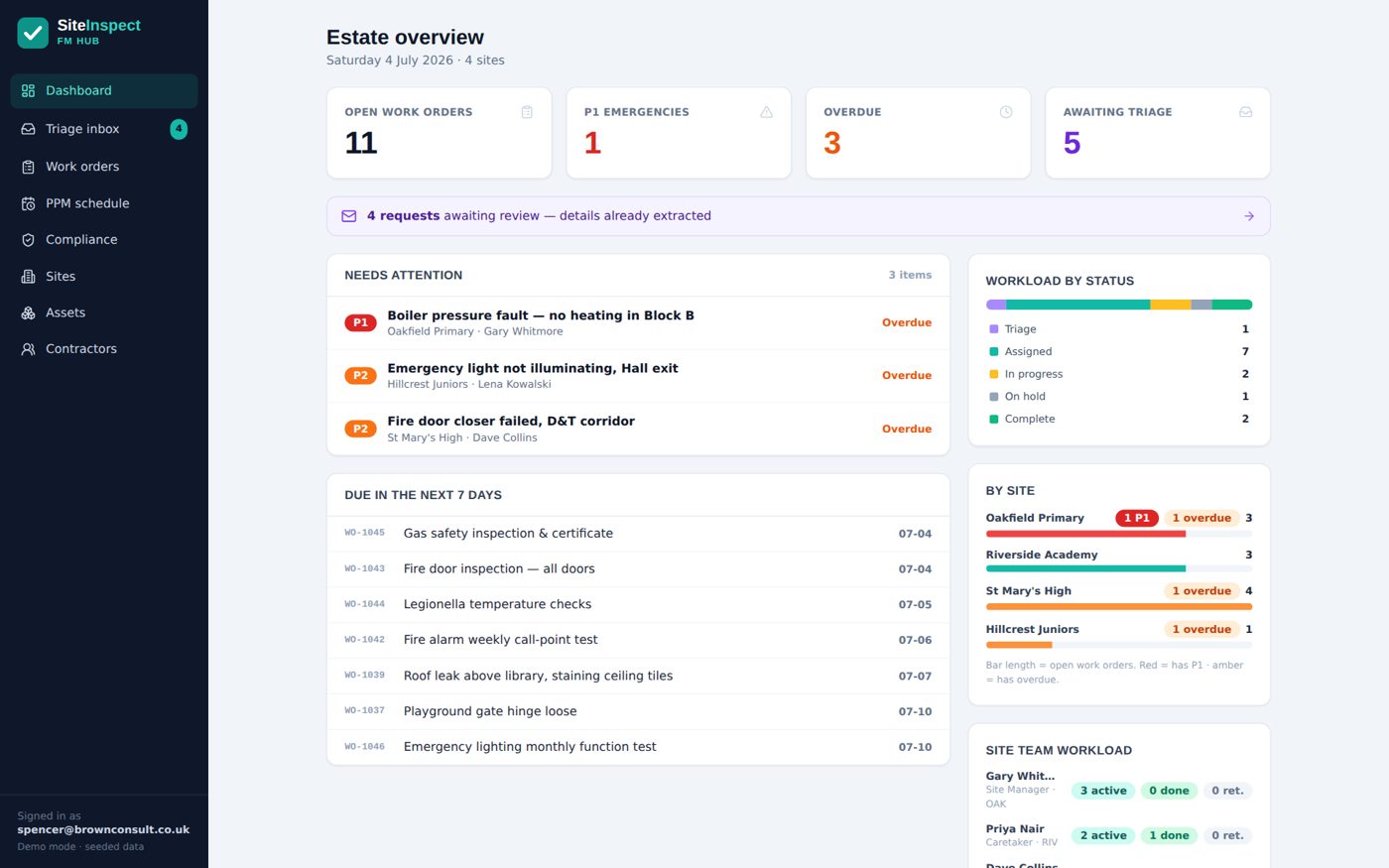
FM Hub Site and estates managers
Triage every request from one queue, including emails and Teams messages drafted into jobs automatically, then run planned and statutory maintenance from the same screen.
Site Team Caretakers and site staff
Jobs arrive on the phone. Add before and after photos, sign off the work, and flag anything that needs a contractor.
Contractor portal External contractors
Contractors see only the jobs assigned to them, upload their certificates and photos on completion, and can't mark a job complete without them.
Leadership Dashboard COO, trust leaders, governors
A live, read-only view of compliance, overdue work and contractor insurance status across the whole estate. No login to another system, no monthly spreadsheet.
These five are FMProof, included in every package. Gold adds InspectProof for digital inspections and AI triage. Platinum adds GovernanceProof for board packs and e-signed approvals.
AI that reads the fault before you do
An urgent email arrives. Before anyone opens it, the site, priority, category, location, impact and access contact are already filled in and a P1 work order is drafted. You check it and click. The AI drafts; people decide.
Morning, there's a really strong smell of gas by the kitchen servery in the dining hall. We've closed the hall and moved the pupils to the sports hall for now. Can someone come today? Call the office on 01234 567204 for access.
- Site
- Riverside Academy
- Priority
- P1 Emergency
- Category
- Gas and heating
- Location
- Kitchen servery, dining hall
- Impact
- Dining hall closed, pupils relocated
- Access
- School office, 01234 567204
- Suggested
- Gas Safe contractor on your approved list
Part of InspectProof, included from Gold up. Unmetered: no per-photo or per-email charges. What the AI sees, and what never leaves your tenant.
The board pack, from the same records
Most trusts pay twice: once for compliance software and again for a board portal to run meetings in. GovernanceProof folds the second subscription into the first. Meeting packs compile to one PDF, approvals are e-signed and timestamped, and the live compliance and PPM figures sit on the board dashboard without anyone retyping them.
- External governors and trustees sign in as secure Microsoft guests. No licences, no fees.
- Board papers, minutes and the policy register stay in your own SharePoint.
- A compliance pack for each meeting, generated from the estate data your site teams already keep.

Ninety seconds of real screens
A photo becomes a drafted job, a gas-leak email becomes a P1 work order, the asbestos guard locks a job until it's acknowledged, and the trust sees the evidence. Then click around it yourself in the live demo.
From reported to resolved in four steps
Report or inspect
Staff report a fault, or the site team runs an inspection on site, online or fully offline.
Triage
Requests land in one queue. Emails and Teams messages are drafted into jobs for your site manager to confirm.
Assign and do
The job goes to the right person or contractor, with photos and access details attached.
Prove it
Every action is logged, and leadership sees compliance across the estate at a glance.
Built for anyone who runs buildings and has to prove it
The live demo runs on a school estate. Pick your sector to see how the same apps fit your buildings.
What a demo looks like
Thirty minutes on Teams with the founder, in a Microsoft 365 tenant set up like yours. No slides, no hard sell, and the live demo stays open afterwards so you can show colleagues.
One published price. Held.
Per site, per year, ex VAT. Unlimited users, AI included, annual contract with sixty days' notice. No per-seat fees and no discount to negotiate: the price on this page is the price on the invoice.
Three cumulative packages from three product lines. Silver is FMProof. Gold adds InspectProof. Platinum adds GovernanceProof.
| Package | 1-3 sites | 4-10 sites | 11+ sites |
|---|---|---|---|
| SilverFMProof | £950 | £795 | £650 |
| GoldAdds InspectProof | £1,595 | £1,395 | £1,150 |
| PlatinumAdds GovernanceProof | £2,250 | £1,950 | £1,650 |
Prices per site per year, ex VAT, at September 2026. A nine-site trust on Gold pays £12,555 a year with no add-ons. Full details and the calculator.
See it running in a Microsoft 365 like yours
Thirty minutes with the founder, in your own time, with a written price at the end. If you'd rather start smaller, the compliance check takes three minutes and scores you on the spot.