Board portal for academy trusts: governance on live evidence
Most board portals digitise the paperwork: packs distributed, minutes filed, papers behind a login.
Useful, and incomplete, because the board's hardest questions aren't about documents. Is the estate compliant? Is planned maintenance on schedule? Were the safety actions closed? A board portal built for a trust should answer those from live data, not from whatever the last report said. That's GovernanceProof: packs, approvals, policies and registers, with the estate wired in underneath, and all of it living in the trust's own Microsoft 365.
The machinery of governance, without the machinery
Meeting packs for the trust board and local governing bodies compile to a single paginated PDF in minutes: agenda, reports and papers in order, published to members with a click.
Approvals are e-signed, timestamped per version, and written to the register automatically, so "was the policy approved, and which version?" always has an answer with names on it.
Policies carry review dates and publish themselves on approval; the registers that consume clerking time (attendance, declarations of interest, training) build themselves from the records the work creates.
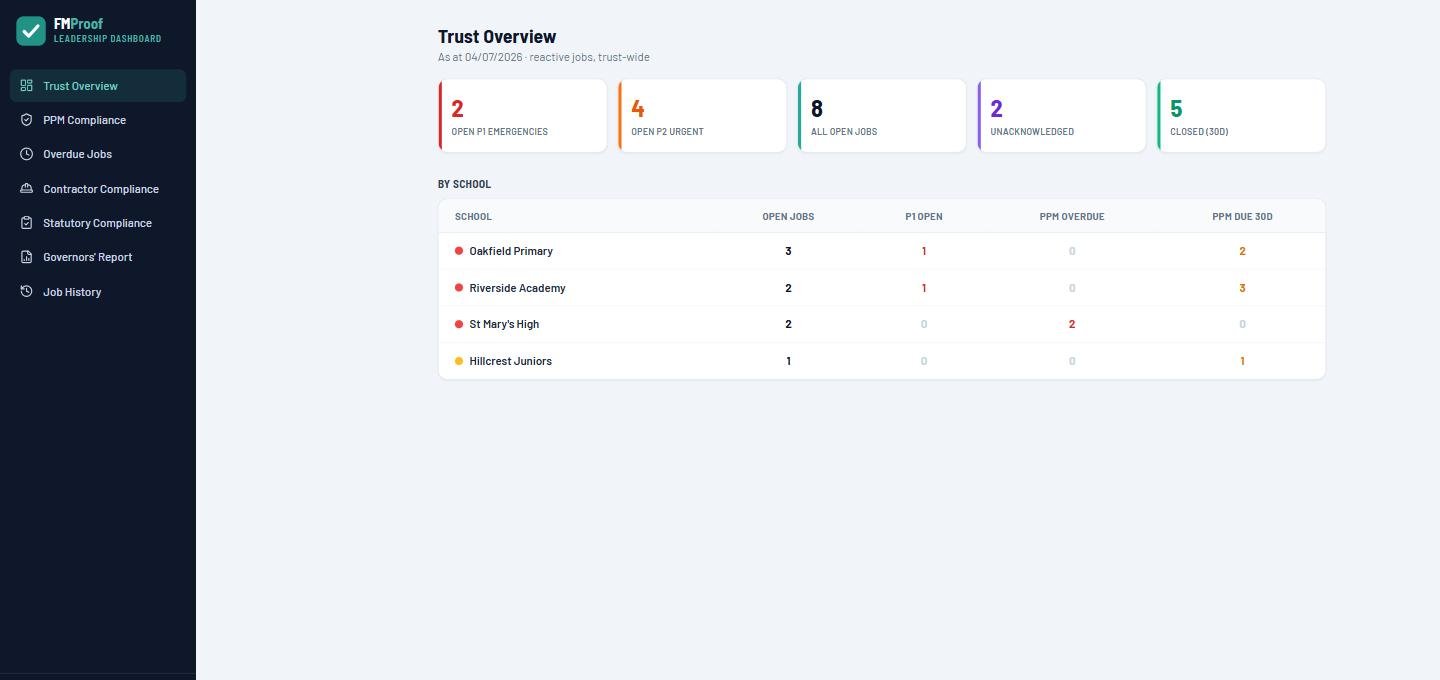
The estate is wired in. Statutory compliance, planned maintenance and health-and-safety figures flow from the operational system onto the board dashboard, and the estates report for each meeting is generated from live data. Governors see the estate as it is, not as it was when somebody last compiled a spreadsheet.

Your scheme of delegation, in your language
A trust's governance isn't generic, and the portal shouldn't be either.
| Your structure | How the portal handles it |
|---|---|
| Trust board, LGBs and committees | Configured to match your scheme of delegation (Finance & Resources, Estates & Audit, Pay), with packs and registers per body |
| Terminology per school | A school sees Governors; the trust sees its own structure. Words configured, not hard-coded |
| External governors and trustees | Secure Microsoft guests in your tenant: no licences, no separate accounts, access IT can see and revoke |
| Estates assurance to the board | Compliance, PPM and safety figures from the live estate records; a governors' report that compiles itself |
| The record-keeping | Attendance, declarations, training and decisions written to registers automatically |
| Where it all lives | Papers, minutes and registers in the trust's own SharePoint, under your retention rules: never a vendor's cloud |
How to choose a board portal for a trust
Eight questions before the procurement paper goes to Finance & Resources.
Where do the papers live?
Board papers and minutes are among the most sensitive documents a trust holds. In your tenant, under your governance, or in a vendor's cloud, under theirs?
What do external members cost?
Per-user pricing punishes exactly the people governance depends on. Microsoft guest access costs nothing.
Does the pack compile itself?
Assembling a paginated pack should be minutes, not the clerk's week.
Are approvals evidence?
E-signed, versioned, timestamped, and written to a register automatically.
Do the registers build themselves?
Attendance, declarations and training records as by-products of the work, not separate admin.
Is the estate wired in?
If estates assurance still arrives as a typed report, the portal is filing, not governance. This is the rare row where we know of no one else doing it our way: packs drawing on the same live records as the estates system.
Does it match your delegation scheme?
Committees, terminology and permissions configured to the trust, not the trust reorganised around the software.
What happens if you leave?
With everything in your own SharePoint, the answer is: nothing. The papers stay exactly where they always were.
Assurance, not assertion
The Academy Trust Handbook's estates guidance asks boards to oversee the condition, compliance and safety of the estate, and from autumn 2026, annual returns against the DfE's estate management standards make that oversight inspectable. A board can only oversee what it can see.
Because GovernanceProof sits on the same records as the estates platform, the board sees the estate live: statutory compliance rates, planned maintenance on schedule, open safety actions, per school. The estates item on the agenda stops being a reassurance and becomes a reading. For the operational half of that story, see estates management software for schools.
What does it cost?
Published, per school per year, ex VAT, unlimited users, banded 1 to 3, 4 to 10 and 11+ schools.
Silver From £650 per site per year
FMProof, the estates platform: fault reporting, work orders, planned and statutory maintenance, contractor portal and leadership dashboard.
Gold From £1,150 per site per year
Adds InspectProof: digital inspections, AI email and photo triage, and the safety screen.
Platinum From £1,650 per site per year
Adds GovernanceProof: board packs, e-signed approvals, policy publishing and the governance registers, on the same records as the estate. The tier this page is about.
Per school per year, ex VAT, at the 11+ band; smaller trusts pay more per school. External governors and trustees join as Microsoft guests at no per-user cost. Price your trust in 30 seconds, or explore GovernanceProof in depth.
Questions buyers actually ask
What is a board portal for academy trusts?
A system for the machinery of trust governance: meeting packs compiled and distributed, approvals signed and recorded, policies versioned and published, and registers (attendance, declarations, training) kept current. The good ones also connect governance to reality, so the estates report the board reads is generated from live data rather than last term's spreadsheet.
How do external governors and trustees sign in?
As secure Microsoft guests in the trust's own tenant, no licence cost, no separate account to manage, and access that IT can see and revoke like any other guest. Views are read-only where they should be, built for governors rather than administrators.
What makes this different from a generic board portal?
Two things. Everything lives in the trust's own Microsoft 365: papers, minutes, registers, under your governance and retention rules, not a vendor's cloud. And the estate is wired in: statutory compliance, planned maintenance and health-and-safety figures flow from the operational system onto the board dashboard, so estates assurance is evidence rather than assertion.
Does it match our committee structure and terminology?
Yes: the trust board, local governing bodies and committees are configured to match your scheme of delegation, in your language. A school sees Governors; the trust sees its own structure, not the other way round.
What does a board portal cost for a trust?
GovernanceProof comes with EstateProof Platinum, from £1,650 per school per year ex VAT, which also includes the full estates and inspection platform beneath it. External governors and trustees join as Microsoft guests at no per-user cost, and users are unlimited throughout.
See a board pack build itself
Thirty minutes, configured with Finance & Resources, Estates & Audit and Pay: the way your trust actually governs. Or click around the governance demo now. Call 020 4558 7729 or email info@estateproof.co.uk.