School maintenance management software: the life of a fault, without the friction
Every school runs on the same loop, hundreds of times a term: someone spots a fault, someone decides what to do about it, someone fixes it, and someone should be able to prove all three happened.
Maintenance management software is that loop with the friction removed, no faults living in a caretaker's pocket notebook, no "did anyone email the plumber?", no end-of-term mystery about what got fixed and what didn't. This page follows one fault through the system, then gives you the buying checklist for the category, including the questions vendors hope you won't ask.
Follow the fault
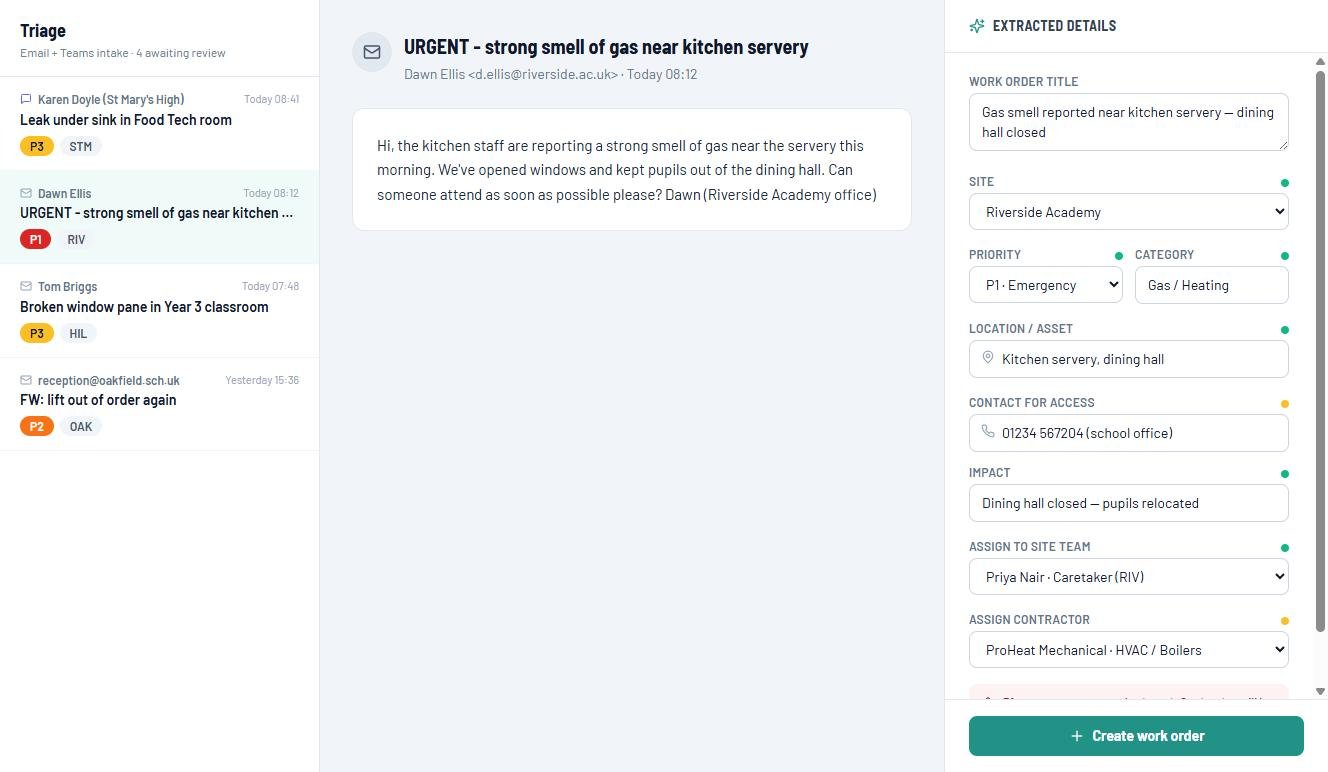
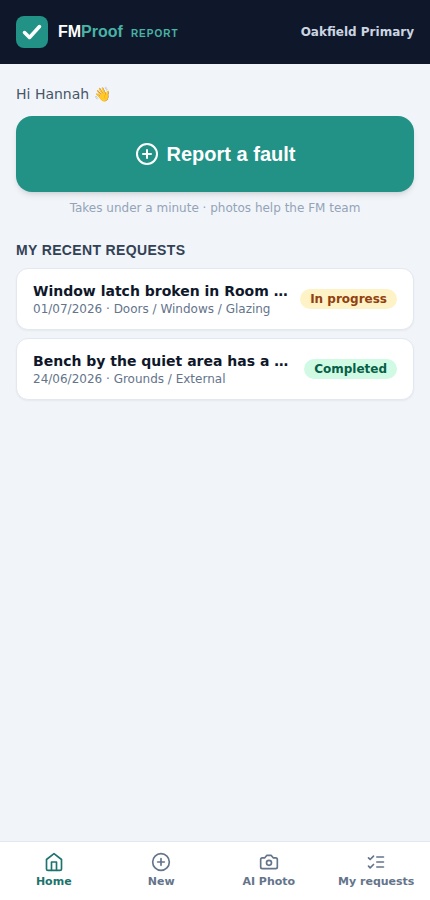
08:12, reported. "URGENT: strong smell of gas near kitchen servery," emailed by the school office. Staff report however suits them: the one-minute phone app, an email to the helpdesk address, or a message in Teams. Nobody needs training, a login list, or the right form.
08:13, triaged. The email lands in the FM Hub's triage inbox with the job already drafted: AI has read it and filled in the site, a P1 priority, the category, the location, the access contact and the impact: dining hall closed, pupils relocated. The FM reviews, adjusts if needed, and clicks once. That's the difference between an inbox and a triage queue: the reading has been done.
08:15, assigned and instructed. The job goes to the site team member for access and the gas contractor for the fix: both notified automatically, the requester acknowledged, the work order live on the dashboard with its target time.
Same day, done and evidenced. The site team app runs the caretaker's day: start, photos, notes, complete, or hand back "contractor required". The contractor updates through a magic link, no login needed. Every step lands on the work order's timeline, so "what happened with the gas smell?" has a two-click answer, forever.
The workflow, role by role
A maintenance system succeeds when each person sees exactly their piece, and is never asked to do the system's admin for it.
| Who | What they see | What they never have to do |
|---|---|---|
| Any member of staff | A one-minute report from their phone, then progress and a "done" notification | Chase, re-describe, or wonder |
| The FM / site manager | A triage queue with jobs pre-drafted by AI; the whole estate on one dashboard | Re-type emails into a system |
| The caretaker / site team | Today's jobs on a phone: start, photo, note, complete | Paper day books and end-of-day typing |
| Contractors | Their job, via magic link: confirm, update, attach certificates | Learn a portal, remember a password |
| The head / the trust | Live counts (open, overdue, P1s) by site | Ask for a report to be compiled |
How to choose school maintenance management software
Eight questions, including the ones vendors hope you won't ask.
Can staff report in under a minute, from anything?
Phone, email or Teams, if reporting needs the right form or the right login, the faults stay verbal.
Does triage read the email for you, or just forward it?
A drafted job with site, priority and location filled in is a different product from a shared inbox with labels.
Do caretakers get a job list they'll actually use?
A phone view built for the corridor, not a desktop system they'll avoid until Friday.
Can a job be dual-assigned?
Contractor to fix, site team for access: real jobs need both, and most systems can only hold one name.
Do contractors work without logins?
Every password you issue a contractor is a support ticket waiting to happen. Magic links get updates; portals get excuses.
Does the requester hear back automatically?
Logged, in progress, done: the three notifications that stop staff re-reporting the same fault and start them trusting the system.
Is reactive work on the same records as planned?
Otherwise you've bought half a system: the other half is in our planned maintenance software guide.
Unlimited users, published pricing, and your data in your own Microsoft 365?
Three questions that reveal a vendor's business model faster than any demo.
Reactive is where culture is won
Estates teams are judged on the leak reported at breaktime, not the strategy document. When staff see their reports acknowledged, tracked and fixed, with a notification when it's done, reporting goes up, faults get caught smaller, and the estate gets cheaper to run. The reverse is also true, and expensive: the free cost-of-reactive calculator puts a number on an estate stuck in firefighting mode.
The DfE's standards push estates towards planned-led maintenance, and that journey starts here: getting the reactive load out of inboxes and into a system that can actually be managed. For the whole-estate picture, see estates management software for schools.
What does it cost?
Published, per site per year, ex VAT, unlimited users, banded 1 to 3, 4 to 10 and 11+ sites. The reactive loop is Silver, the entry tier.
Silver From £650 per site per year
FMProof: staff fault reporting, work orders, dual assignment, site team app, contractor magic-link portal, planned maintenance and the leadership dashboard. The tier this page is about.
Gold From £1,150 per site per year
Adds InspectProof and the AI layer: email and photo triage that drafts jobs for one-click confirmation, digital inspections, and the safety screen.
Platinum From £1,650 per site per year
Adds GovernanceProof: board packs, e-signed approvals and policy publishing, on the same records as the estate.
Per site per year, ex VAT, at the 11+ band; smaller estates pay more per site. Price your estate in 30 seconds, or see EstateProof configured for multi-academy trusts and schools.
Questions buyers actually ask
What is school maintenance management software?
The system that runs a school's reactive maintenance loop: staff report faults from a phone, email or Teams; the estates team triages and assigns; caretakers and contractors work from their own views; and every step is recorded, so the estate is managed from a live queue rather than an inbox and a notebook.
How do staff report a fault?
Three ways, all under a minute: the Requester app on any phone (photo attached), an email to the helpdesk address, or a Teams message. Reports land in one triage queue either way, and the reporter gets acknowledged automatically and notified when the job's done.
What does the AI triage actually do?
It reads inbound emails and Teams messages and drafts the work order (title, site, priority, category, location, access contact, impact) for the FM to review and confirm with one click. Nothing is created without a human sign-off, and a rules-based fallback covers estates that prefer AI off.
How do contractors use it?
Through a magic link on each job, no login, no password, no training. They confirm attendance, update progress, and attach documents and certificates; their updates land on the same work order timeline the school sees.
What does school maintenance management software cost?
The full reactive loop (staff reporting, work orders, site team app, contractor portal, dashboards) is Silver, from £650 per site per year ex VAT with unlimited users. AI email and photo triage arrives with Gold from £1,150; Platinum from £1,650 adds governance. Bands at 1 to 3, 4 to 10 and 11+ sites.
Watch a fault go end to end
Thirty minutes, no hard sell: report, triage, assign, fix, evidence, on an estate like yours. Or open the live demo now, no sign-in needed. Call 020 4558 7729 or email info@estateproof.co.uk.