Statutory compliance software: every duty on one spine
Whether you run schools, care homes, church halls or housing stock, the buildings carry the same skeleton of legal duties: fire safety kept in efficient working order, water systems managed against legionella, gas serviced annually, electrics inspected, asbestos managed, lifting equipment examined. Statutory compliance software puts that whole skeleton on one register (each duty with its frequency, its next due date, its named owner and its evidence), so that "are we compliant?" stops being a filing expedition and becomes a glance. This guide covers the duties by system, what the software must do with them, and the questions to ask any vendor.
Organised by system, not by folder
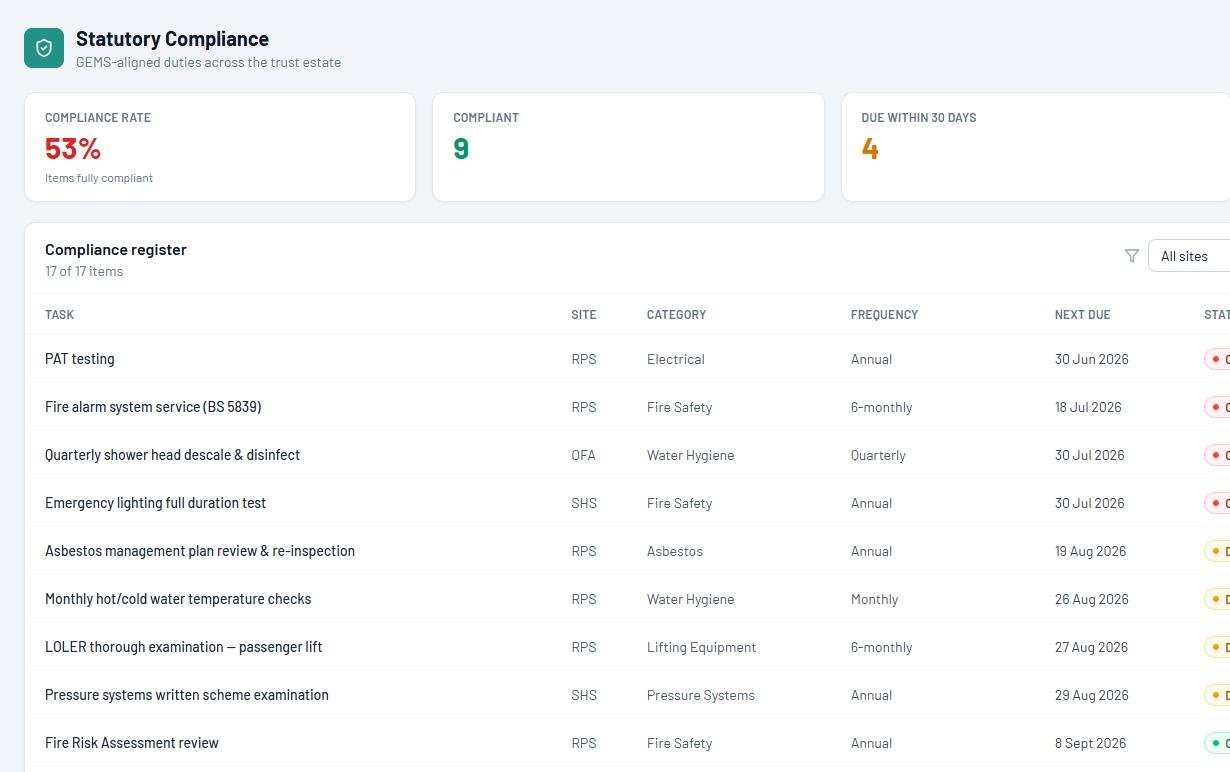
Compliance evidence usually accumulates by accident: a fire folder here, a water log there, gas certificates in an inbox, the asbestos survey wherever the surveyor left it. The register inverts that. Each building system (fire, water, gas and heating, electrical, asbestos, lifting equipment) carries its recurring duties as live entries with frequencies and owners, and the evidence lands against the duty at the point of work.
Ownership is half the battle. Some duties belong to your own site team (weekly alarm tests, monthly water temperatures); others need a competent person under contract (gas, EICR, LOLER). A real register holds both on one schedule (chasing the contractor before their visit falls due, and flagging the in-house check the moment it slips), so responsibility is never a matter of memory. The scheduling mechanics are covered in our planned maintenance software guide.
The result reads like the screen on the right: every duty, its status, and nothing hiding in a folder.
The duties, system by system
The recurring legal backbone for most UK non-domestic buildings. Exact regimes vary by use and risk assessment, but a register that can't hold these lines isn't a compliance tool.
| System | Core recurring duties | Legal basis |
|---|---|---|
| Fire | Written fire risk assessment kept under review; weekly alarm tests; six-monthly servicing; fire door inspections; emergency lighting tests | Regulatory Reform (Fire Safety) Order 2005; BS 5839 / BS 5266 / BS 9999 |
| Water | Legionella risk assessment kept live; monthly temperature monitoring; written control scheme | ACOP L8; HSG274 |
| Gas & heating | Annual service and safety check of appliances and pipework by a Gas Safe engineer | Gas Safety (Installation and Use) Regulations 1998 |
| Electrical | Periodic inspection of the fixed installation (typically five-yearly); risk-based portable appliance testing | Electricity at Work Regulations 1989; BS 7671 |
| Asbestos | Management plan kept live; known materials re-inspected, typically annually | Control of Asbestos Regulations 2012, Reg 4 |
| Lifting equipment | Thorough examination: six-monthly where people are lifted, twelve-monthly otherwise | LOLER 1998 |
Sector detail matters: the same skeleton wears different flesh in schools, care homes, charities and dioceses and housing associations. And for the whole year mapped month by month, there's the free compliance calendar.
How to choose statutory compliance software
Eight questions, whatever buildings you run.
Is the statutory schedule built in?
The duties in the table above should exist on day one at sensible frequencies, corrected to your contracts, not assembled from blank templates.
Does overdue shout?
A duty slipping past its date should change the dashboard the leadership looks at, not a cell in a spreadsheet nobody opens.
Does evidence attach at the point of work?
Certificates, photos, readings and sign-offs on the duty's own record, not in a folder maintained by good intentions.
Are contractors managed in the same place?
Reminders before visits fall due, chases when they slip, insurance and DBS expiry tracked: one system, not a parallel spreadsheet.
Do failures become actions automatically?
The out-of-range water temperature or failed door check should raise a tracked job, not a note.
Can every member of staff flag a problem?
Unlimited users, because the propped fire door is spotted by whoever walks past it.
Does it roll up across sites?
Compliance position per building and for the whole organisation, live.
Where do the records live, and what happens when you leave?
EstateProof writes everything into your own Microsoft 365 tenant, so your compliance history is never a hostage at renewal. Ask every vendor to match that in writing.
Your compliance history is legal evidence. Treat it that way.
These records exist to protect the organisation and the people accountable for it: years after the work was done, and regardless of which software subscription happens to be current. Most vendors hold your history on their servers, which converts your own legal evidence into their renewal leverage.
EstateProof writes every duty, certificate, photo and audit trail into your own Microsoft 365 tenant, under your governance and your retention rules. Leave, and it's all still there, readable by your staff in the SharePoint they already use. That architecture is the first thing to compare when you put us side by side with Every and iAM Compliant.
What does it cost?
Published, per site per year, ex VAT, unlimited users, banded 1 to 3, 4 to 10 and 11+ sites.
Silver From £650 per site per year
FMProof: statutory maintenance schedules, compliance overview, fault reporting, work orders, contractor portal and leadership dashboard.
Gold From £1,150 per site per year
Adds InspectProof: digital inspections whose failures raise their own jobs, AI email and photo triage, and the safety screen.
Platinum From £1,650 per site per year
Adds GovernanceProof: board packs, e-signed approvals and policy publishing, on the same records as the estate.
Per site per year, ex VAT, at the 11+ band; smaller estates pay more per site. Price your estate in 30 seconds.
Questions buyers actually ask
What is statutory compliance software?
A single register of the legal duties an organisation owes on its buildings (fire, water hygiene, gas, electrical, asbestos, lifting equipment), each with its frequency, next due date, named responsibility and the evidence that it was done. The software's job is to make overdue impossible to miss and evidence impossible to lose.
How is this different from health and safety software?
Statutory compliance is the recurring, legally-driven schedule on the buildings themselves; health and safety software usually means people-side systems like accident books and training records. The two meet at the premises: safety walks and hazard reports feed the same records the compliance register draws on. EstateProof covers the premises side of both.
Will auditors and inspectors accept digital compliance records?
Yes. The legislation behind these duties prescribes outcomes and records, not formats. What matters is that records are complete, dated, attributable and retrievable on demand: a timestamped digital record with a photo and a named signatory is stronger evidence than a paper sheet, provided you can produce it when asked.
Does it work across multiple sites?
Yes: the register runs per site with a leadership rollup across all of them: compliance position, overdue duties and contractor cover on one screen. Pricing is per site per year with bands at 1 to 3, 4 to 10 and 11+ sites, so multi-site organisations pay a lower rate per site.
What does statutory compliance software cost?
EstateProof publishes its prices: from £650 per site per year ex VAT (Silver, with the compliance overview and statutory maintenance schedules), £1,150 for Gold (adding digital inspections and AI triage) and £1,650 for Platinum (adding governance packs). Unlimited users at every tier.
See the register live
Thirty minutes, no hard sell: the statutory spine running on an estate like yours. Or open the live demo now, no sign-in needed. Call 020 4558 7729 or email info@estateproof.co.uk.